
Making Interactive Maps Accessible
Image maps and location maps are a great way to manage complex information or to add a layer of interactivity. But with this tool comes complexity for the user. If the user can’t interact with your map or, worse, doesn’t know that the content exists, the map loses its purpose.
To achieve the best experience for all users, your maps must be easy to read, understand, and interact with.
Specific issues could include:
- making maps keyboard accessible
- avoiding keyboard traps
- providing map content in alternative formats
- using labels to enhance accessibility
- making map content accessible when stylesheets are disabled
This OzWiki category outlines what to avoid, as well as best practice for presenting a location map visually and functionally so that all users will have the best experience. As image maps can involve using complex images with interactive hotspots, they have similar issues and some specific problems are included in this category.
Perhaps you need a comprehensive list of likely issues related to the use of interactive maps and image maps in web content – and how to address them. Or maybe you just want to ask a direct question and get a clear, expert response.
OzWiki tells you what you need to know in order to use interactive maps and image maps in an accessible way. The Interactive Maps section details 20 accessibility problems and how to address them, demonstrating compliance with 16 WCAG Level A success criteria, and 4 WCAG Level AA success criteria.
As a subscriber, you’ll also be able to request further or more detailed information relating to your specific situation.
See an example
Interactive map does not have an accessible alternativeInteractive map does not have a text alternative
| Category | Interactive Maps |
|---|---|
| Topic | Alternative |
| WCAG SC 1.1.1: Non-text Content | All non-text content that is presented to the user has a text alternative that serves the equivalent purpose, except for the situations listed:
http://www.w3.org/TR/UNDERSTANDING-WCAG20/text-equiv-all.html |
| Level | A |
| Technique(s) | |
| Impact | High |
Error
An interactive map has been provided without an accessible equivalent.
Incorrect Example(s)
Example 1
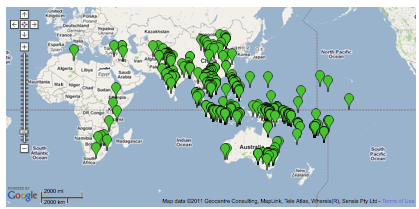
Solution
Ensure that the interactive map has a text equivalent that lists the pertinent information in the map.
OzWiki is an accessible resource that provides best known methods to achieve A & AA level design and interaction for web content in areas such as Audio, Video, Link, Captcha, Maps, Navigation and more. These outlined accessibility errors, examples and solutions help you become 508 compliant by demonstrating associated WCAG 2.0 success criteria and techniques.
Gain access to more detailed information on all OzWiki categories for only $39/month by purchasing a subscription today! You can cancel your subscription at any time.