The history of the accessibility of PDF (in Australia)

In the late 2000s, the Australian Government conducted an enquiry into the accessibility of PDFs by:
- Requesting public comment
- Testing PDFs with blind and low vision users
- Testing PDFs against WCAG2
- Talking to assistive technology manufactures
- Talking to Adobe
At that point, PDFs were defined as not “accessibility supported” for the following reasons:
- The design of the PDF file (almost all PDFs on the web were not tagged with accessibility features)
- Technical functionality of the assistive technology (many assistive technologies, at that time, did not support tagged PDFs very well and did not support untagged PDFs at all)
- The skill of the end user (many users did not know how to adequately use their assistive technology with a PDF to access all features)
As a result, the Australian Human Rights Commission released this statement:
“Overall, the Study found that there is insufficient evidence to establish that the development of the Portable Document Format and improvements in assistive technologies have advanced enough for PDF files to be considered accessible for people with a disability, particularly for those who are blind or have low vision…
“The Commission’s advice, current October 2010, is therefore that PDF cannot be regarded as a sufficiently accessible format to provide a user experience for a person with a disability that is equivalent to that available to a person without a disability, and which is also equivalent to that obtained from using the document marked up in traditional HTML…”
Therefore, at that time, the only way to provide an accessible PDF in Australia was to:
- Use tagging features on PDF
- Provide an accessible alternative via HTML, text, Word or RTF
In 2013, the Australian Human Rights Commission reviewed the accessibility of PDF files and found that there had been some improvements, but that PDFs continued to be inaccessible for people who were blind in the mobile environment. They released this statement:
“However there is currently a significant limitation on the accessibility of PDF documents in the mobile environment, as mobile screen reader technology does not reveal any information contained in the markup tags.
“The Commission’s advice, current February 2014, is therefore that PDF cannot be regarded as a sufficiently accessible format to provide a user experience for a person with a disability that is equivalent to that available to a person without a disability, and which is also equivalent to that obtained from using the document marked up in traditional HTML.”
Therefore, at that time, the only way to provide an accessible PDF in Australia was to:
- Use tagging features on PDF
- Provide an accessible alternative via HTML, text, Word or RTF
Why people choose to use PDFs
It is still unclear as to whether PDFs can be made accessible; however, they do not contain the accessibility features inherent in traditional HTML. In addition to this, there are many times that PDFs are used when they should instead be web pages. Therefore, before including PDFs on your web site, it is essential to ensure that they are being used in the appropriate circumstance.
The following are not valid reasons for using PDFs instead of traditional HTML:
- Security
- Brand
- Ease of publication
Security
Often people argue that content needs to be in PDF to ensure security of the information. Traditional HTML is much more secure than PDFs. PDFs with security features enabled can still be modified easily, and there have been some famous cases in Australia where this has occurred, the most prominent being the publication of a doctored City of Sydney Annual Report (PDF) to indicate a $14.2 million spend on interstate travel (instead of $4,206).
Brand
Often people argue that content needs to be in PDF to protect the brand view. It is true that PDF provides a static view of the content, whereas Word documents often appear differently on different devices. However, with almost half of all internet users accessing content on a mobile device, hero images and other information used to promote a brand can cause significant problems for users. Traditional HTML can promote brand just as well, if not better, than PDF.
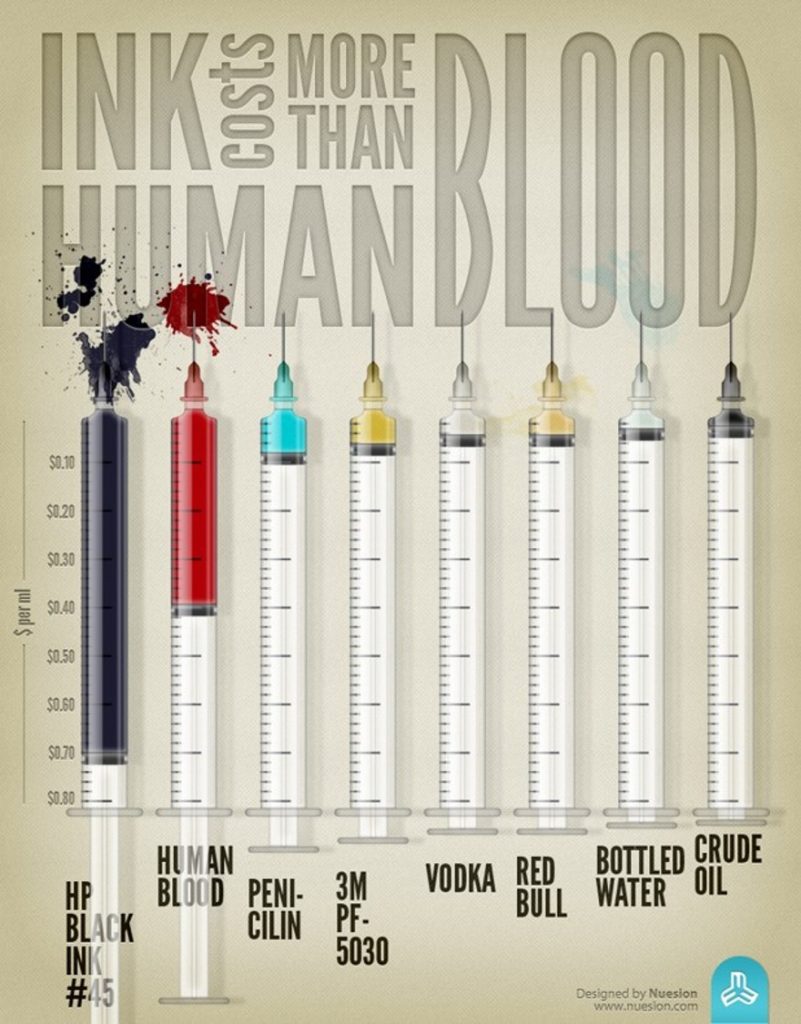
Ink costs more than human blood – and a few other things! Use sparingly!
Often people argue that content needs to be in PDF because the content will be printed by the end user. However, printer ink is incredibly expensive (one of the most expensive items by weight in the world), which only passes on the cost of printing to the end user, who often cannot afford it. Printed copies are an important publicity method but it is essential that the cost of printing should be borne by the organisation itself and not passed on to end users. If end users want printed versions, then the organisation should print hard copies and send them to users. This also allows for users to request large print or other language print formats.
Ease of publication
Often people argue that content needs to be in PDF because the content is short-lived and already exists in a document format: for example, an agenda for a public meeting. However, these documents are never created in PDF – they are usually created in a word processor, such as Microsoft Word. Therefore, sometimes downloadable documents are preferable, as they allow for downloading and printing from web sites or sharing via email. However, it is important to include accessibility features, and we recommend that two formats are shared—Word and PDF—to provide a wider range of accessibility to end users.
Want to learn more?
Check out our CEO, Gian Wild’s paper, “Are PDFs an accessible solution?”
Need accessible documents, or conversions to HTML?
AccessibilityOz can help you! Check out our Services page on Accessible Word, PowerPoint, Excel, PDFs, Email and HTML documents, fill out our Document Remediation quote request or get in contact.
Need to convince someone else, or need training?
We can do that too! We offer this article as a seminar: PDFs and accessibility and the following document training:
- Accessible Document Design Principles
- Creating Accessible Word Documents
- Creating Accessible PowerPoint Documents
- Creating Accessible Excel Documents
- Tagging PDFs for Accessiblity
… or check out our other training!